Most Claude Code prompt lists are padded with variations of “write me a function.” That’s not where the time savings live. The prompts that actually save time share a structure: they scope the work, name what “done” looks like, and make Claude prove the result instead of claiming it.
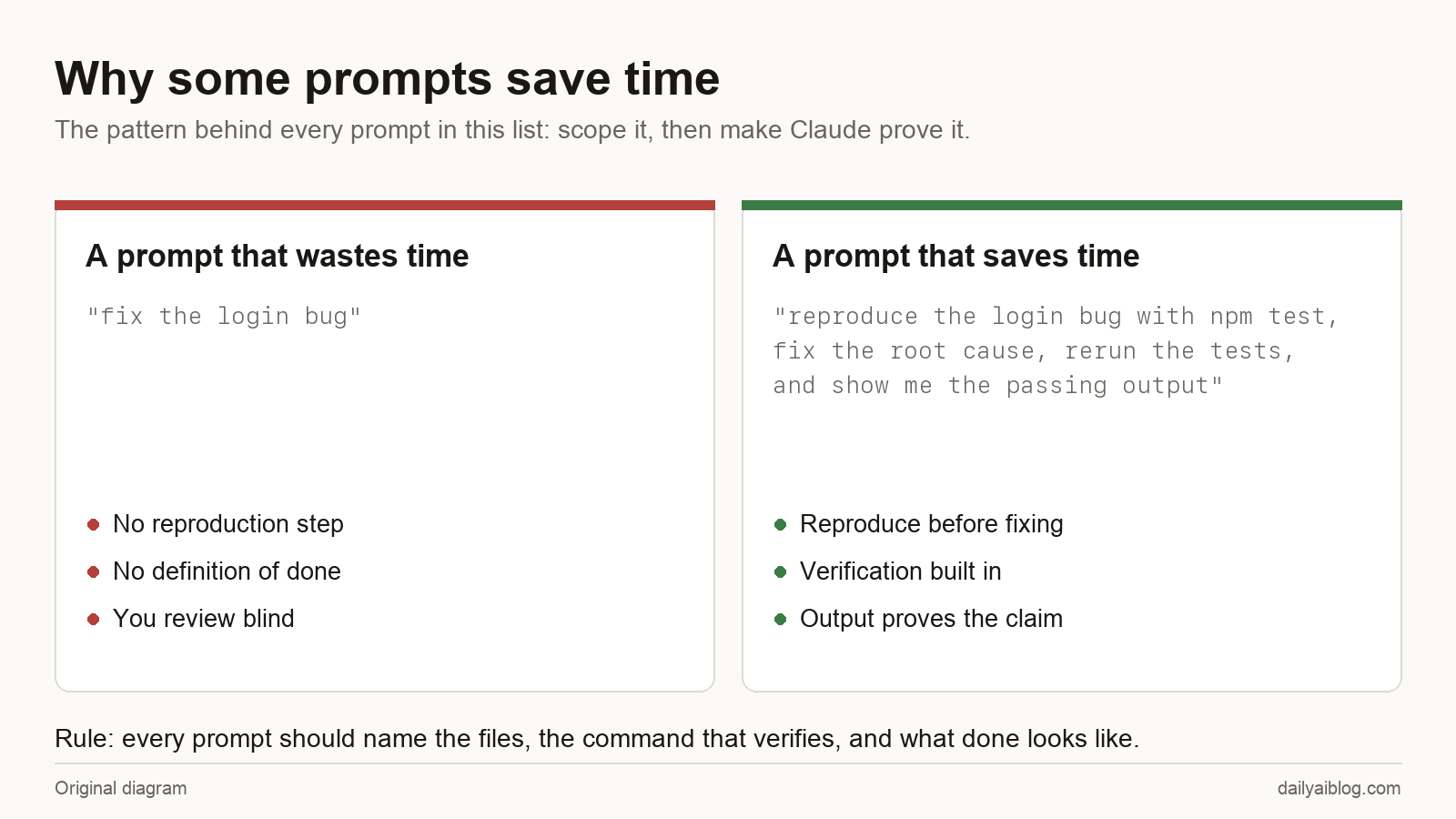
That’s the pattern behind all 50 prompts below. You’ll see the same three moves over and over:
- Name the files or the command —
@src/auth.js, “runnpm test” — so Claude doesn’t guess at scope. - Build verification into the ask — “run it and show me the output” turns a plausible answer into a checked one.
- Say what you’ll do with the result — a summary, a commit, a table — so the output arrives in usable shape.
Everything here works in the terminal, the VS Code extension, or the desktop app. Prompts that need a specific flag or setup say so. Copy freely — that’s what this page is for.
Understanding a Codebase (1–6)
1. The new-repo orientation
give me an overview of this codebase: what it does, the main architecture
patterns, and a glossary of project-specific terms I'll keep running into
The glossary ask is the sleeper. Every codebase has five words that mean something non-obvious, and knowing them early saves days.
2. Find code by behavior, not filename
find the code that handles password reset emails — trace the whole flow
from the API route to the actual send
You rarely know the filename. You always know the behavior.
3. The data-model map
what are the key data models here, how do they relate, and which one
should I be most careful about changing?
4. Execution tracing
trace the login process from front-end to database, listing each file
it passes through in order
5. The conventions extractor
look at 5 representative files and tell me this project's conventions:
naming, error handling, test style, how imports are organized
Do this before your first PR to any codebase you didn’t write, and your code reads native instead of transplanted.
6. Delegate the deep dive
use a subagent to investigate how our auth system handles token refresh,
and report back just the summary
Exploration fills your context window with file reads you’ll never look at again. A subagent does the reading in its own context and only the conclusion comes back.
Fixing Bugs (7–12)
7. The full bug report
I'm seeing this error when I run npm test: [paste the full stack trace].
It happens consistently. Find the root cause before proposing a fix.
Paste the whole trace, say whether it’s consistent or intermittent, and give the reproduce command. Those three details change the diagnosis.
8. Reproduce first, always
reproduce this bug before you touch anything. If you can't reproduce it,
tell me what information you'd need — don't fix blind.
The single best debugging habit, encoded as a sentence. A fix for an unreproduced bug is a guess wearing a suit.
9. The regression hunt
this worked last week. Look at recent changes to the payments module and
tell me which change most likely broke it, with your reasoning
10. Root cause vs symptom
the fix you proposed patches the symptom. What's the underlying cause,
and what would fixing THAT look like?
Keep this one on a hotkey. It’s the difference between closing a ticket and closing it twice.
11. The intermittent-bug interrogation
this test fails maybe 1 run in 10. List the usual suspects for flaky
behavior in this kind of code — timing, shared state, ordering, network —
and check each one against our test
12. Fix plus insurance
fix this bug, then add a regression test that would have caught it,
then run the whole suite and show me the output
The “show me the output” ending is doing real work: it converts “I fixed it” into evidence.
Tests and Code Quality (13–18)
13. The workhorse
write tests for the auth module, run them, and fix any failuresWithout “run them,” you get tests that look plausible. With it, you get tests that pass.
14. Find the gaps
which functions in src/services have no test coverage at all?
rank them by how bad it would be if they broke
The ranking ask turns a coverage report into a priority list.
15. Edge cases you didn’t think of
look at this function and list the edge cases my tests don't cover:
error paths, boundary values, empty inputs, unexpected types.
Then write tests for the three worst ones.
16. Match the house style
add tests for NotificationService following the exact patterns in our
existing test files — same framework, same assertion style, same naming
17. The pre-commit review
review my uncommitted changes for bugs, unhandled errors, and anything
that doesn't match the project's conventions. Worst problems first.
If you find yourself typing this often, save it as a custom slash command. The best prompt on this list is worthless if the version you actually type is the lazy one.
18. Lint the whole project
fix every lint error in this project, then run the linter again and
confirm the count is zero
Git and GitHub (19–25)
19. Commit with a real message
look at my staged changes and create a commit with a message that says
WHY, not just what
20. The untangler
I have uncommitted changes that are really three separate pieces of work.
Split them into three logical commits and tell me what went where.
One of those things that’s genuinely tedious for humans and trivial for Claude.
21. Pull request, fully dressed
create a PR for my changes: summary, why-this-approach, what to focus on
in review, and any risks worth flagging
22. Review a PR before you review it
summarize what PR #142 actually changes, what could break, and the three
files that deserve the closest human look
23. Resolve conflicts with context
help me resolve these merge conflicts — for each one, explain what both
sides were trying to do before picking a resolution
24. The release notes writer
look at everything merged since the last release tag and write release
notes: user-facing changes first, grouped by feature, no commit jargon
25. Archaeology
when and why was the retry logic in api/client.js added? Check the git
history and any linked issues, and summarize the story.
git blame tells you who. This tells you why, which is what you actually wanted.
Refactoring and Maintenance (26–31)
26. Deprecation sweep
find every use of deprecated APIs in this codebase and list them by
effort to fix: trivial, moderate, needs-discussion
27. Refactor with a safety rail
refactor utils.js to use modern JavaScript while keeping identical
behavior — run the tests before AND after, and show me both outputs
The before-and-after run catches the case where the tests were already broken and the “after” pass means nothing.
28. Small, reviewable steps
plan this refactor as a series of steps where each one leaves the tests
green. Show me the plan before touching anything.
Better yet, do this in plan mode (Shift+Tab to cycle to it) — Claude proposes, nothing touches disk until you approve.
29. The duplication detector
find logic that's implemented more than once in this codebase and
recommend which copy should become the canonical one
30. Dependency audit
which of our dependencies are outdated, which have known security issues,
and which upgrades are actually risky? Table, please.
31. Dead code sweep
find code that can't be reached anymore — unused exports, functions
nobody calls, feature flags that are permanently on — and list what's
safe to delete
Terminal One-Liners (32–38)
These use claude -p, which reads stdin and writes stdout like any Unix tool. This is where Claude stops being an app and becomes a component.
One flag to know before any of these goes into a script: --bare skips auto-discovery of hooks, skills, plugins, MCP servers, and CLAUDE.md, so the command behaves identically on every machine instead of inheriting whatever a teammate has configured. The docs recommend it for scripted and CI calls and say it will become the default for -p. One limit worth knowing: piped stdin caps at 10MB — past that, write a file and point the prompt at the path.
32. Explain the last failure
npm run build 2>&1 | claude -p "explain the root cause of this failure in two sentences, then the fix"33. Log triage
tail -200 app.log | claude -p "flag anything anomalous and say which entries I should actually worry about"34. Commit-history digest
git log --oneline -30 | claude -p "summarize what's been happening in this repo lately, grouped by theme"35. The diff reviewer
git diff main | claude -p "review this diff for bugs and security issues. filename:line for each finding. nothing else."36. Structured output for scripts
claude -p "extract the function names from auth.py" --output-format json \
  --json-schema '{"type":"object","properties":{"functions":{"type":"array","items":{"type":"string"}}},"required":["functions"]}'
JSON out means your scripts can branch on Claude’s answer. Pipe it to jq '.structured_output'.
37. The typo linter
git diff main | claude -p "you are a typo linter. report filename:line and the issue for each typo. return nothing else."“Return nothing else” is what makes output usable in a pipeline — no preamble to strip.
38. Batch explain
ls scripts/*.sh | claude -p "read each of these scripts and give me a one-line description of what each does"Data, Files, and Words (39–44)
Claude Code works in any folder, not just codebases — a fact non-developers consistently underuse.
39. The spreadsheet analyst
analyze data/sales-july.csv: trends, top and bottom performers, anomalies,
and anything I should act on. Five bullets max, every bullet needs a number.
40. Cross-file reconciliation
compare data/inventory-system.csv with data/inventory-count.csv and list
every discrepancy with its likely cause
41. The folder janitor
propose a cleanup of ~/Downloads: consistent names, duplicates identified,
a folder structure that makes sense. Show me the plan — don't move anything yet.
That last clause matters. Plan first, execute after approval, stay in charge of anything destructive.
42. Notes to action items
read notes/client-call.md and extract: decisions made, action items with
owners, unanswered questions, and what needs a follow-up email
43. The editor who cuts
edit this draft for concision. Cut 20% without losing any claims or
examples. Show the three biggest cuts you made and why.
44. Format conversion drudgery
convert all the .docx exports in this folder to clean markdown, preserve
headings and lists, and name the files after the document titles
Meta-Prompts: Managing Claude Itself (45–50)
45. Plan before code
don't write any code yet. Ask me the questions you need answered, then
propose a plan. We start when I say go.
For anything non-trivial, the ten minutes of questions saves the hour of rework.
46. The assumption check
before you continue: list the assumptions you're making about how this
should work. I'll correct the wrong ones.
Wrong assumptions are invisible in output until something breaks. Making them explicit is absurdly cheap insurance.
47. The honest uncertainty ask
which parts of this solution are you confident about, and which parts
should I double-check myself? Be specific.
48. Resume where you left off
claude --continueNot a prompt — a flag, but it belongs on this list. Yesterday’s context, restored. claude --resume gives you a picker. (Session docs.)
49. Write it down for next time
we just established that deploys go through scripts/deploy.sh and staging
must be tested first. Add that to CLAUDE.md so you know it every session.
Anything you’ve explained twice belongs in CLAUDE.md. Sessions are temporary; the file isn’t.
50. The self-audit
before we finish: what did we leave incomplete, what should be tested
more, and what will future-me wish present-me had written down?
The end-of-session prompt. It regularly surfaces the thing you forgot you deferred at hour one.
The Pattern, One More Time
Look back at the prompts that seem most useful for your work and you’ll find they’re all the same move: scope + verification + destination. Name the files. Name the command that proves it worked. Say what shape you want the answer in.
The vague version of any of these prompts still produces output — that’s the trap. It produces output you have to check by hand, which is the time you were trying to save.
If you want to go further:
- Turn your five most-used prompts from this list into custom slash commands, so the good version is the one your fingers reach for
- Move the recurring ones out of the chat entirely. Number 37 is one line away from being a
package.jsonscript that runs on every diff — that’s the jump from “prompt I remember” to “check that happens whether I remember or not” - The official common workflows and best practices docs are the canonical versions of many patterns here, and stay current as the tool changes
The prompt-pattern diagram was created for Daily AI Blog. Several prompts are adapted from the official Claude Code documentation; the rest come from daily use running this site.
Share this article
Leave a Reply