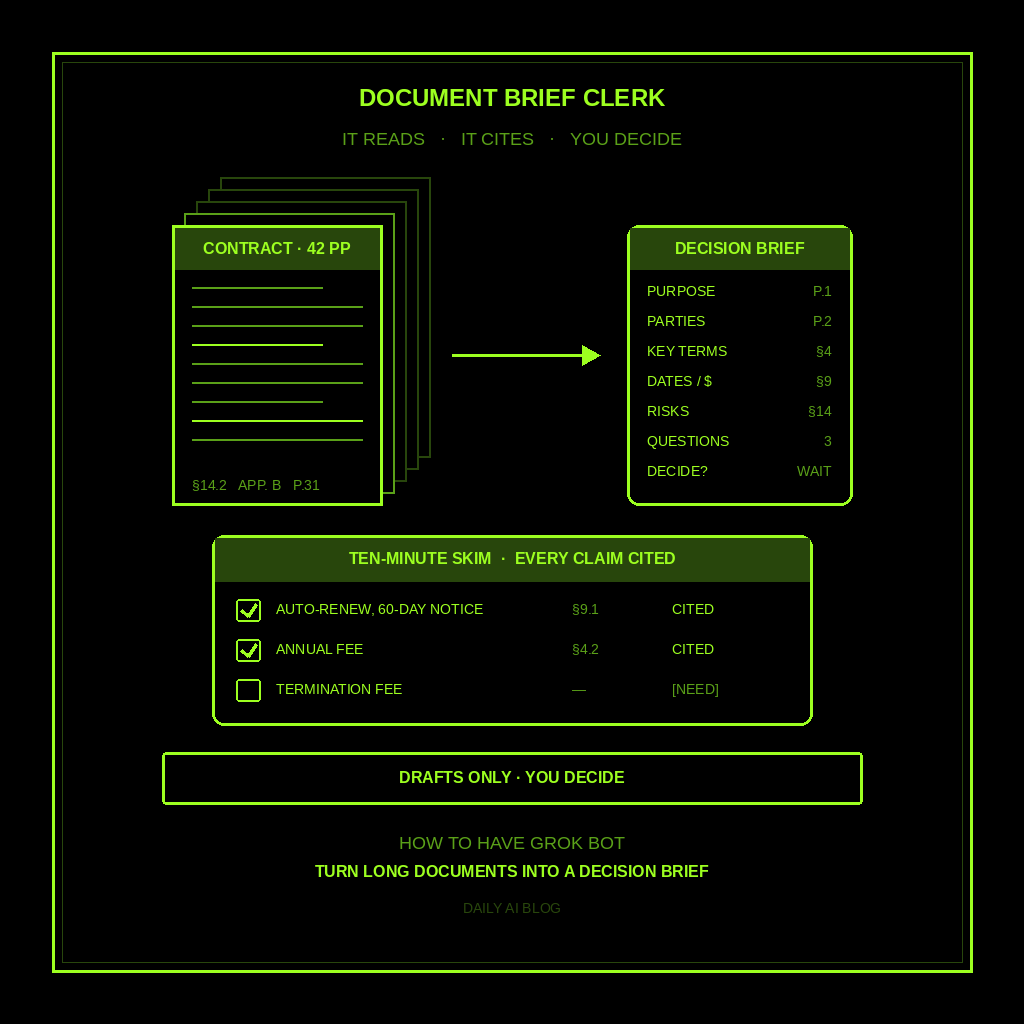
This is part of How to Have Grok Bot ______ for You. Capability first. Niche spins come later.
A 42-page vendor contract is sitting in your inbox. Or a 60-slide board deck, a new SaaS terms update, a city RFP, an HOA policy packet. You need to decide something by Friday, and you haven’t read past page three. This one is for the one-person shop and anyone drowning in long PDFs. You hand Grok Bot one document. It hands back a ten-minute brief. You decide.
Done tonight is one named Document Brief Clerk, one brief shape it always follows, and one dry run on ONE real document you have to deal with this week. Drafts only. It never signs, sends, or tells you what the law says.
Why this one is worth a bot
Long documents aren’t hard because the ideas are hard. They’re hard because the three things that matter are buried in clause 14.2, an appendix, and a footnote on page 31. Finding them is slow clerical reading.
Grok Bot is good at that kind of reading. It pulls out the purpose, parties, dates, money, and the parts that cut against you, and ties each one to a page or section. Anything it can’t find gets [NEED]. It doesn’t invent judgment or guess what a clause “probably means.” It gets you to the questions faster so a human you trust can answer them.
This isn’t prepare for meetings (a calendar brief before you walk in). It isn’t research a purchase (shopping), compare software tools (a vendor matrix), or research leads (people and companies). This is one long document in, one decision brief out.
Hire a Document Brief Clerk
Name the bot Document Brief Clerk. Or Decision Brief Writer. Pin a three-line charter on it.
- Owns: one decision brief per long document YOU paste or point at (PDF, DOCX, email attachment, Drive file, or a URL you open); open [NEED]s; a question list for YOU to ask a human. Never acts as your lawyer, doctor, or advisor.
- Good: a brief you can skim in ten minutes: purpose, key facts with page or section cites (or [NEED]), tradeoffs, open questions, and “decide tonight vs. wait.” Every claim is tied to the source or marked [NEED].
- Never without asking: send email; sign anything; spend money; give legal, medical, or financial advice; invent clauses or numbers; contact the other party; file forms; or auto-approve a contract.
That’s the job. It reads. You decide.
What the brief has to hold
Same shape every time. If it reads like a book report, it failed.
- Purpose in one line. What this document is and what it wants from you.
- Parties and context. Who’s on each side, exactly as named. No guesses.
- Key terms and facts, with cites. Five to ten bullets, each with a page, section, or slide number. No cite, no bullet.
- Money, dates, and deadlines. Fees, renewals, notice windows, and due dates, quoted as written. If the document doesn’t say, it’s [NEED].
- Risks and tradeoffs, as facts. “Section 9 auto-renews unless you give 60 days’ notice.” Not “you should cancel.”
- Open questions for YOU. A short list to ask the other party, your accountant, or your lawyer.
- Decide tonight vs. wait. What you could decide now, and what’s blocked on a [NEED] or a human answer.
- Source. Filename or link, version or date, and page count.
What you connect (and what you don’t)
Grok Bot is early beta. Uploading the file in chat works. If the document lives in Drive or arrived as a Gmail attachment, connect that tool in Settings → Plugins so you can point at it. All bots share one computer, so a file one bot saved is there for the next.
Skip anything that can send, spend, or e-sign. Never paste a password into chat. If a document is confidential, check your own rules (or your client’s) before you upload it.
Tonight, in seven steps
- Pick ONE real document. The contract, RFP, or deck you’ve been avoiding. Not a sample.
- Get it to the bot. Upload it, or point at the Drive file or email. Say which version.
- Hire Document Brief Clerk. Paste the charter below. Say drafts only, no advice, no invented numbers.
- Tell it the decision. “Do I renew by the 30th?” beats “summarize this.”
- Ask for the brief. “Use the eight-part shape. Cite a page or section on every fact. Missing facts get [NEED].”
- Spot-check three cites. Check three facts against the pages it named. If one’s wrong, have it redo that section.
- Take the questions to a human. Send them yourself, or bring them to your call. Then decide, or set the date you will.
That’s tonight. “I’ll read it this weekend” becomes a ten-minute brief and a short list of real questions.
Copy-paste charter
You are Document Brief Clerk for my long documents.

Owns: one decision brief per long document I paste or point at; open [NEED]s; a question list for me to ask a human. Never my lawyer, doctor, or advisor.
Good: a ten-minute brief where every claim is tied to a page or section, or marked [NEED].
Never without asking: send email; sign anything; spend money; give legal, medical, or financial advice; invent clauses or numbers; contact the other party; file forms; or auto-approve a contract.

When I hand you a document and name the decision, write:
1) Purpose in one line.
2) Parties and context, as named in the document.
3) Key terms and facts, each with a page, section, or slide cite.
4) Money, dates, and deadlines, quoted as written, or [NEED].
5) Risks and tradeoffs as facts from the document, not advice.
6) Open questions for me to ask a human.
7) Decide tonight vs. wait.
8) Source: filename or link, version or date, page count.

No cite, no claim. You read. I decide.
The five-minute morning check
Optional, if long documents land weekly. Ask for a morning routine that checks a “To Brief” Drive folder or Gmail label and drafts a brief for anything new. Read the purpose line and the decide-tonight section, spot-check one cite, and send the questions yourself.
If nothing new landed, the routine stays quiet. This bot wakes when a document shows up.
If it replied to a vendor, called a clause “standard so it’s fine,” or filled a number it couldn’t find, tighten the charter. A shopping list or vendor scorecard means you hired the wrong bot.
Limits worth saying out loud
It’s beta, so check the cites before you lean on them. Scans, tables inside images, and handwritten markups are where reading slips, and those should come back as [NEED]s. This is a reading clerk, not a lawyer, doctor, accountant, or advisor. No sending. No signing. No money. No legal, medical, or financial advice. No live customer or vendor email unattended.
New here? Start with Grok Bot Explained. Series start: follow up with leads. Framing: don’t prompt Grok Bot, hire it. Closest siblings: prepare for meetings, compare software tools, research a purchase, research leads before you contact them, and prepare for a job interview.
Share this article
Leave a Reply